Monday, 4 May 2015

The End of the Blog Journey ……or is it?


When beginning this course I will be the first to admit I was daunted by the idea of ITD in the classroom. I was quite confident with the use of PowerPoint and knowing my way around Microsoft office, I could barely add my own pictures to my computer to use and of course Google was my friend. So as you can imagine when I looked at the different ITD that we would be working through I was quite overwhelmed. I certainly wasn’t ready for the crash of ideas that began cascading through my mind on just how I was going to be able to use this technology each week as we learnt about all the different applications available. One personal obstacle I had to overcome was making my work public for my peers to read. It is one thing to write something and have your teacher give you feedback on it, but quite another to put your work out there for everyone to read. Thinking about that now as a teacher this would have to be a consideration when asking students to do the same.  

Image by Swanson


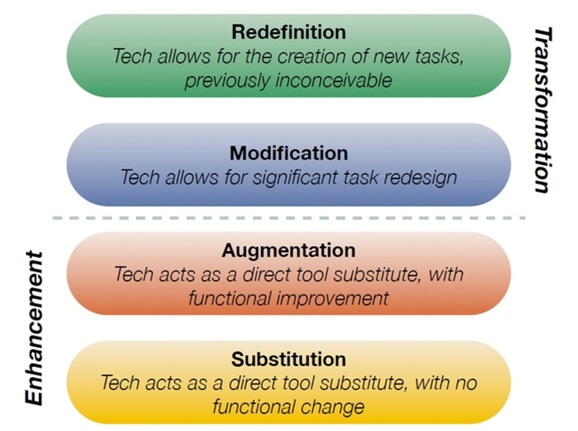
The world is changing and fast, the use of ITD in the classroom is becoming a tool that teachers can use to provide effective learning experiences for their students. Through this course I have been able to gain a deeper understanding and thought process regarding different ITD and their use in the classroom. At first the idea of using the SAMR model and Blooms taxonomy in conjunction with ITD didn’t make sense, as you can see from my earlier posts. It wasn’t until my last blog post that I was actually able to combine the process in my mind and link my ITD platform with these frameworks. Being able to create ITD practices, that link with critical thinking and redefine work that was previously impossible without the use of ITD, will have positive benefits for all students in the classroom. The ability to critically reflect on the multitude of ITD was one of the most powerful tools I have obtained through this course. These skills presented themselves as quite a useful tools, making sure that the experience I would provide with ITD was giving the students the ‘Higher order thinking Skills of Blooms taxonomy’. Also bringing into focus the SAMR model as a tool to discern whether the ITD I had chosen to use did in fact provide students with a platform to modify or redefine a task rather than just a substitution of other forms of resources. It is important also at the planning stage to consider the Dimensions of Learning (DoL), Written by Marzano, the DoL plans out a framework for teachers to ensure that students have the right attitude towards learning, that they are capable, that they not only acquire knowledge but use it critically, just like the SAMR model and Blooms taxonomy, teaching students to take the knowledge and skills we provide them and use them in context. The DoL cover a range of pedagogical practices that used in conjunction with SAMR, Bloom’s and ITD can create engaging learning environments in the classroom for all students. How would think look in a classroom? As a home economics teacher an example of redefinition of ITD in the classroom and higher order thinking could look like this. An assignment where students need to choose a culture from around the world, engage via ITD with a student from that area and design an essay about the different style of food, preparation and so on. Then have them design a menu or eating plan from information about that culture. This is a process that before ITD would have been unable to happen.


I think at this stage it is imperative to remember that there is a broad range of technology and it is rapidly changing therefore as an educator in the 21st century we need to stay in touch with what is available. The best ways for teachers to keep up to date with ITD in the classroom is, I believe a combination of personal development, collaboration with peers (particularly is your chosen subject) and educational research on digital literacy


Whilst ITD in the classroom can bring many positives it is also important to ensure that all students are safe while online and are taught through explicit instruction that there are legal, safe and ethical behaviours they should use whenever they use technology. Schools now follow procedure about photography of students with a legal need due to the far reaching abilities of the internet. The Government have set up the ‘Cyber smart’ website which is made for students, parents, teachers and schools and can be found here . Educators in Canada have created a website full of ideas and tools for teachers to use in the classroom concerning our ‘digital footprint’ which has a range of videos and activities for all to watch and can be found here This is important and relevant information for all students in regards to their own personal safety and the legal and ethical behaviour they need to use whilst online. 
Crowd-Sourced Cybersafety Wordle

My defining moment throughout this course however was a personal one. I shared this information on my thinglink blog posted 11 April 2015 where I discussed working on an ITD project with one of my peers and how I really benefited from it. I began reflecting on this and realised that not only did that experience change my view on collaboration but reading the weekly blogs of others in this course (yes I didn’t reply to all) really helped me to understand some of the ideas and concepts that I either had wrong in my mind or just gave me a wider view of. This in itself was something that I have struggled with for many years, but I have found an appreciation for collaboration as well as the wide range of uses ITD have provided. So is this indeed the end of my Blog journey? I think not!


Sunday, 26 April 2015

Brainstorming with the Mind Map!

This week I have chosen to talk about Online Concept Mapping, and in particular Bubbl.us. Bubbl.us is an online mind mapping tool used to brainstorm ideas. It allows you to save mind maps as an image, share your work via email, print your mind map, create colourful mind map organisers, embed your work into a website or blog and work with others in collaboration online. To save your mind maps you need to register for a free online account, which can only be accessed via a user name and password. Therefore this is a private service, however when shared the privacy will depend on where and how you share it. This online mapping tool is able to be customised. The maps are built as you go and can even be colour coded, you can make new connections as you brainstorm and so on. The free version only allows limited access. This includes only being able to save three mind maps, this issue can be worked around by saving your mind maps as images and deleting them from the site. There is also an option to set up group mind maps which you can customise, this would be a great tool in the classroom for small group work. This group option is only available through the paid service. I found Bubbl.us easy to use, although I did have some trouble at first working out how to embed it. After a little research I found out that you can either copy the embedded code from the menu at the lower right hand corner of the page, or email yourself a copy of the mind map and use the actual URL
.
The kind of learning outcomes this application could support in the classroom would be, acquire and integrate knowledge, extend and refine knowledge and use knowledge meaningfully. There are many ways to use this software in the classroom. Using the SAMR model I will explain some uses in the classroom.
  • ·         Substitution - students could work individually and use the mind map tool purely as a direct substitute instead of writing one.
  • ·         Augmentation – teacher can use the software on an interactive whiteboard and brainstorm with students, colour coding for added emphasis.
  • ·         Modification – students can create their own mind maps on a set class task, colour coding for what I already know, what I want to know and questions. Send this to the teacher so before they begin a topic the teacher has information on where their students are and what they want to know.
  • ·         Redefinition – Teachers can set group tasks for homework assignments. Each group being given a set task, each student colour coded in each group, working online to complete. 
Below is a link to a mind map that I have created on different ITD that we have looked at over the weeks. I have really enjoyed creating with this tool and can see myself using it in a classroom situation


Saturday, 11 April 2015

Thinglink - or if your me keep calling it Thinklink.......

Our Lecture was an interesting take on the course weeks work. For the first week I actually really struggled to connect with any of our ITD choices. Usually I have one picked and my brain is bubbling over with ideas on how to use it in the classroom. However I walked into our lecture and the first words out of my mouth were I had trouble with this weeks tasks...(in secret speak mean't I didn't really connect with any of them!!!!!!). However this wasn't really true, I did like the idea of the virtual museum and had played around with a few ideas but because Presi had given me heartache so internally I had decided to be difficult and not like any of them.


Mim had other plans! Now since this is my Blog I'll be honest and I'm sure you'll all be shocked but I like to work alone, plough straight in and get the work done. I have found working in groups so much hard work previously. So when Mim told us we would be doing just that today I inwardly moaned. On top of that I got the one activity that I really didn't even get through because of said frustration at not getting Presi to work. So Bec and I got to work on Thinklink......Bec was quick to correct me that the name was actually Thinglink, hehe, and I'm off to a great teamwork start.

However for the first time this group activity didn't frustrate me! Bec and I quickly worked out what we wanted to do and divided up our jobs and off we went. So what is thinglink? basically it is a way to tag images. In a little more depth you are able to have a collage that when scrolled over you can actually have all information about that Image/idea and you can also put links into it for further information. You can then ...... apparently link it other media groups, which we struggled to do, I'm not sure if it was because we logged into the ipads with one gmail account and wanted to link it to another but our ipad just would not let us.


Playing around with ThingLink a little more I have worked out how to add it to my page but not into a Blog I have already started writing. Frustrating!!!!! 

What I did discover this week though is that I did enjoy working in a group, Bec and I worked well together, we threw ideas at each other and I enjoyed it! It was almost like a step up from reading everyone else's Blogs something that I normally just don't do, but I find it really interesting that we are all taking in the same information and processing it so differently, and just reading the output and getting new perspectives from everyone else is in fact a great way to learn and help with the reflection process. Thanks Bec!!! 

Sunday, 5 April 2015

And the Blog keeps “MOVIE’ING” on!


I know, I know but I couldn't help myself with the title of this week’s blog! Only four weeks in and I can’t believe how many things I have learnt to do, each week I think yup that’s it I have it now this is my favourite thing to use and then we learn something else. It’s almost overwhelming in its entirety. When I worked through the tasks set out this week I thought that I was going to talk about downloading and resizing images, because we all know those painful moments when you’re trying to move through information and it’s taking too long and everyone is getting bored. That was until our tutorial this week when we were introduced to ‘MOVIE MAKER’…….

Movie Maker is a free software that allows you to create mini movies. By taking photos and videos you are able to create mini movies, using features of Movie Maker you can include audio tracks, narration, effects, transitions pretty much all the things you need to create a movie. Movie Maker can be used on PC and MAC and is very easy to use. When we were first asked to try Movie Maker in class I will admit I was very worried however I took to it very quickly and was able to move through the instructions with limited help. Upon trying it at home I was able to use it pretty well my only issue at first was getting music off my pc as I tried other avenues first, students would be able to navigate Movie Maker with ease. From observations on the Movie Maker website Privacy seems to be guided by the maker of the film as to where they share the video.   

Learning Outcomes would be for students to be able to create, create, and create. Firstly create an idea (let’s take Home Economics, I know a surprise!); “The High Tea” Students would be able to decide on food, decorations, settings. They could create the food, create the atmosphere and then create their own Movie. Bloom’s Taxonomy sites creating as higher order thinking, add to this evaluating and analysing their own work before adding it to the movie and this project would be an extensive learning experience for students. Following the SAMR Model due to the fact that students can highly modify the Movie Maker application to suit their own personal style I believe that the use of Movie Maker would be in the Transformation stage. 

It seems all was going well until I tried to add the video to my blog. I could only add the video at the start instead of through the middle as I intended however it still looks effective.

Monday, 30 March 2015

I just made a new Voki. See it here:

I just made a new Voki. See it here:

YOU ARE INVITED TO HIGH TEA!


In this weeks class we have been asked to find and resize some photos so keeping in line with my Home Economics Theme I resized some High Tea photos I had from my daughters birthday last year.  

and yes I was crazy enough to make all this food and the little girls all loved it!!


Saturday, 28 March 2015

The Classroom Blog!

What is a blog I hear you ask, and how can it be useful in a classroom?
Well a blog is a Web site, usually run by an individual however others can add comments or if the teacher creates a team blog can post ideas as well. By using an interactive classroom blog students can collaborate, share ideas and work with each other on structured activities on their own unique classroom blog. Learning outcomes that this can support is reflection on class activities, progressive idea sharing all while being structured and monitored by the teacher. The use of a blog can also help students progress through different ITD framework testing and building on learning platforms. In senior grades blogs can be created and used by students for assignments or their own personal reflection on their progress in the classroom which constructs a thinking, analysing brain pattern.


So how would I use this platform in the classroom? As soon as I made my first blog I had so many ideas on how well this would work in my classroom. Being a Home Economic based teacher the ideas are endless. The one I will discuss here is the use of a team blog created for each class. These class blogs could be set up for each different year level and class and once set up each student would be able to add to and interact with each student in the classroom. Setting up links to different ideas like healthy eating plans, nutrition, food blogs and recipe caches the teacher can get students searching for and reflecting on different choices set out for them or by them each week. Weekly tasks of food preparation could be set by the teacher for students to cook, put together or find recipes they would like to cook, having the students upload images. For higher grades assessment tasks could be set into a blog where personal cooking, food ideas, processes and so on could be added to weekly by the student for an end of semester assessment portfolio.


To define the SAMR model and the blogs interaction by students for each level and the use in the classroom is not as easy a task as I thought to begin with. I feel the first two levels Substitution and Augmentation would have students only following the blog and possibly replying to the teacher through comments when they felt the need. Almost like having a PowerPoint or work on the board with students asking questions of the teacher if they felt it was necessary. With the creating of a team blog however I feel this lends itself more to a platform that follows the Transformation side of the SAMR model where students themselves can modify the blog by adding content or in fact taking it to the next level and creating their own blog where they get to design, transcribe and reflect for their peers and the teacher.


The use of a blog in a Home economics/Hospitality classroom is endless. The interaction between the teacher and students would be unlimited; with so much in the way of ideas on the internet this would indeed lend itself to be absorbing for the students, with the addition of links to videos, recipes, food related content, pictures …. The ideas go on and would only be limited to the imaginations of the students and teacher. 

Saturday, 21 March 2015

To use it or not to use it!

Coming into this course I knew how to create a PowerPoint, make a few slides, and send emails, I know impressive! By the end of the second week of Digital Pedagogies in Secondary school, I have my own blog and wiki and have interacted with both. I have used flipboard in class and interacted with my classmates and honestly my mind is in over drive thinking of using these interactive ICT programs in a classroom situation. Learning how to be able to transform or modify a wiki to be able to create an activity that will be suitable for an interactive assignment in the classroom is an invaluable tool to have.

Reading through the course readings this week, two ideas that I really took notice of and reflected on was firstly giving students in your class a project or set of work to complete and letting them produce work with different platforms of ICT. Secondly was to allow students to use ICT in the classroom so that they can work at independent rates. Both of these ideas would benefit all students in the class and I would be very interested to find more information on any research done in this area to find out whether it is a viable teaching aid.

With the wiki activity we were all involved in this week even though we worked in small groups we were able to do so at our own pace. Setting it up using de Bono’s hats theory also ensured that each person answered different aspects of the question. By using de Bono’s hat theory the lecturer was able to create the higher order thinking structure needed to complete the activity without direct instructions pertaining to each detail required.


What I really enjoyed about the wiki activity was being able to read others ideas, a collaboration of sorts where I could gain other ideas and theories. I feel that Wiki’s and interactive boards would be great ways for teachers to share ideas with others in their fields as well as letting their students do the same with peers. So to use it or not to use it? ICT in the classroom is a must, and as teachers in the 21st century we need to find new and creative ways to ensure our students remain engaged. By using ICT I think we can do this, it won’t be easy to begin with and will require ongoing personal development however the end results will be worth it in the end.

Monday, 16 March 2015

Moving up the Digital Pedagogy Train


Tying in new information with old can work quite easily in theory however putting it into context in the classroom can be an entirely different matter. The idea of using Technology in the classroom at the basic level can be all that some teachers aspire to. Depending on the pedagogical practices of the teacher in the learning environment the use of ICT in the room can be at many different levels. Using Bloom’s Taxonomy as a tool to measure the stages of learning and thinking, the basic needs in the classroom would begin with providing knowledge to students. Standing beside the SAMR model this would consist of Substitution or Augmentation technical tools such as Power-points, links to videos or blogs on the subject.

As teachers in a fast moving technical environment we need to proceed through to the critical thinking level of Bloom’s Taxonomy, along with SAMR model. To do this requires teachers to use Profession Development to acquire skills in the knowledge of ITC tools available to produce higher order thinking, and tying them into their own pedagogical practices in the classroom. To ensure Higher order critical thinking teachers will need to implement and instruct students in the use of ICT tools that will not only act as a direct substitute to traditional methods of pedagogical instruction but also in how to transform and redesign learning tasks.


What is good Pedagogy?

Obviously not the picture presented here!! However this is one of my favourite quote/pictures because I feel it explains quite well just what a classroom consists of.


Obviously we don’t have elephants, fish and monkeys in our classrooms (even though it might seem so at times!) this metaphor depicts the different styles of students we will teach! So to answer my question what is good pedagogy? Well it is a number of things, knowing your learners and how they learn (AITSL). Understand that all students are different and have different values and teach with this in mind. Teach not only the content but teach your students higher order thinking skills so they can expand on your teaching. Engage your learners, pass on your own passion for learning and discovering and teach your students to be lifelong learners! Teach your students about the world around them and enable your learners to be able to make a difference whether it be large or small. Everyone makes a difference and it is up to them whether it impacts a few or many, as a teacher aim to change as many lives as possible!!!!
Hi All, 

Wow my third post! I feel like I might be getting the hang of this (almost....) I'm going to be honest writing a blog for all to see is very intimidating, especially if your not sure your on the right track, and I'm not sure if this table is exactly right so I'd LOVE some feedback! this table is from the week 2 course materials. I know its long and I still feel like I should have used a few more ideas in the classroom but at this point in time I think this might work

Thanks!
  
Pedagogy
What does it ‘look like’ in practice
What does it NOT look like in practice
Facilitating deep knowledge through higher order thinking
To facilitate higher order thinking in the classroom, is to provide students with the capacity to acquire knowledge, and expand on that knowledge themselves. For example in an activity in Home economics I could give all students a basic recipe, provide a few different ingredients and ask them all to create an expanded recipe using any of the extra ingredients provided and their basic recipe. This would provide the students with knowledge of how to not only follow a recipe, but know how to add to or change a recipe depending on their preferences and available ingredients.
Providing students with all the information they needed in a classroom without asking them for their own input. Again using the previous example, however giving them just a recipe to follow with the changes already made.
Facilitating collaborative learning in which conversations are important
Collaborative learning is an important tool for the classroom, one that can provide students with the tools to enable themselves to gain knowledge from their peers. In the classroom this can look like many different things, working together to create mind maps, group work in the classroom or using IT to work with others around the world. Teaching you students to have conversations with others to work through problems will enable them to progress through the levels of Bloom’s taxonomy
To not use collaborative learning in the classroom would disadvantage students. To have all students either listening to the teacher or working on their own would mean they would not acquire the skills to look outside themselves. They would not learn to engage with peers or to find knowledge from other people. Working with others can not only provide answers but also more questions or another way of looking at a problem, which are all invaluable tools they would miss out on.
Supporting students in knowing how they learn best
By providing multiple ways of teaching in the classroom will enable learners to work out how best they learn for themselves. AITSL standard 1, 2 and 3 all provide guidelines on what a teacher should know and provide their students in the classroom. By knowing your learners and how they best learn you can ensure your teaching covers all areas. Teachers can also provide this information to their students as they teach them so as to enable students to be able to help themselves as they learn.
By not following the Professional standards and providing differing teaching styles for students, teachers will not enable all their students’ equal opportunities to learn. Standing in front of a class and teaching by rote will not teach students that learning in other ways that they can in fact learn from other methods.
Planning learning that is problem-based, and situated in real life contexts
This is a very basic need for all students to be able to learn. One in which they can work through a problem by themselves or as mentioned above know how to collaborate with others to find a solution. Again I will use the context of Home Economics, give students an assignment to create a weekly menu of meals at home. They will have a basic pantry of supplies, a dollar amount/budget to spend and have to follow the healthy eating plan set by the Australian Government, National Health and Medical Research council. They will then have to cook 3 meals or snacks from this plan.  Thus teaching students to plan, budget, find recipes and cook in a set time. These are skills used daily in real life contexts.
How this would not look in the classroom would be providing all work without relating it to real life situations. Instead of the work plan previously only providing recipes they can cook will not teach them to work through problems themselves. Depending on what recipes the teacher chooses will not take into context the students’ real life situation of food preferences. Not providing skills to create a shopping list, budget, or follow a healthy eating plan provides no higher order thinking, nor real life connections.
Is relevant to students, and connects to their background knowledge
Ensuring what you are teaching is relevant to students will ensure that they can make connections to the learning materials. Students need to feel that what they are learning will be something they needs to know, can use in their lives or relates to them in some way.
Last century teaching has moved on. No longer are we teaching by rote where it is the same information for all regardless of the student’s ability or need. In this situation students will not engage in learning and acquire any knowledge relevant.
Supports learning that is owned, controlled and managed by students themselves
By setting up structure early on students can gain skills to enable themselves to learn at their own pace. This is an important strategy for students to learn not only for higher education but also as a life skill. In the classroom this could be seen as a project with limited structure, therefore letting the student decide just what they will choose as a subject, how they will complete it and by what methods.
Over guidance by teachers can dramatically reduce the self-learning skills required by students throughout their schooling life and into a working environment. In the classroom this could be seen in over structuring all work for students by teachers at all times without options.
Is socially supportive, engaging, and values cultural knowledge’s
I believe that this is shown especially in areas with high diversity of students. To teach and support students to be socially supportive of difference. To teach about different cultures and religions gives empathy and compassion to all human beings and as such is a valuable tool to learning about the world we live in.
Australia is diverse and as such our classrooms will be as well. To not support this does not follow the national guidelines in the form of the professional standards. To not support difference in the classroom does not support teaching all our students regardless of difference.
Is supportive of the development of active citizenship, and strong group identity
Getting involved! Getting students to think about and engage in the world around them is a gift that teachers can provide to students. It will not only provide skills for each student but will enable them to begin to make informed choices about decisions they make. To teach a student that they can make a difference is a valuable lesson.
To not support students in learning that they can make a difference because what can one single person do? This would be seen a detrimental not only to the student but also to society. Not teaching students to think about their actions, not enabling that higher order thinking goes against all we are studying at this point in time.


Sunday, 15 March 2015

Keeping up with the Gen Z’s
As with most of my class, this first week has been an eye opener to say the least. From Blogs to wiki’s (still not too sure about these however I have one!) to a very handy tool, flip board. The expansive world of ITD in the classroom is beginning to show its entirely large and expansive head. It is so overwhelming yet at the same time entirely fascinating, and I would be lying if I didn't admit to being a little excited about what is next to discover.
I have been reflecting on just what to write about here and where to start and something my daughter said to me this morning was very interesting. She told me the teacher had changed the seating arrangement in her classroom and instead of sitting in groups they were now in rows…..”we can’t work together! There is no one to talk to about my ideas” and just that insight from a 9yr old told me that even at that young age the dynamics of the classroom and the ways that children want to learn have changed from when I was the same age. I would never had thought the same way I would have happily just worked by myself without the collaboration of my peers and not thought about it at all. This generation has moved forward not only by IT being introduced into the classroom as a tool but IT changing the way children think, learn and discover, students have realised that working together as a group benefits them all.

Watching the Sparks and Honey video I began to realise that Gen z has grown up with a different set of learning tools. Before the web we had libraries, you would go (by yourself) look up the information and off you went. Now students can gather information from all over the world from their own classrooms, they can watch videos about how to do and make things. They can talk to other students from the other side of the world and find out so much more up to date relevant information than we ever could. This is the way of Gen Z and the future and as teachers we need to ensure that we teach our students how to do this. We also need to ensure that as teachers we learn how to do this as well so we can utilize the tools available.

Judy Willis pointed out that for students to learn we need to keep them ‘curious’, by keeping them curious you will make them want to hear what you have to tell them. Learning is the key focus in the classroom and for Gen Z it needs to be at a consistent pace, using tools they interact with daily, and be done in a way that is best suited to the learners. By ensuring that you have the skills in ITD across the board you will be able to ensure that you keep interest up in the classroom.

Ken Robinson is worried that we are killing creativity in our students, that by the time they reach high school, they have lost the ability to be creative, purely because we have made making mistakes a bad thing. Personally I believe that making mistakes leads to focused learning, as a chef I use my mistakes (or near mistakes) to learn from and extend my thinking skills to create something better…..even when I have something that is good I’m always thinking of ways to change that. As teachers we need to teach this skill to our students! NEED to teach this. There is no better way to retain information than doing it wrong, working out what went wrong and working out how to fix.


The one thing that did stick in my mind though was from the Ken Robinson TED talk. He was talking about an interview he had with Gillian Lynne, a famous choreographer who in the 30’s was taken to a Doctor because she couldn't sit still in class. The Doctor told her mother to put her into dance and Ken asked her how it was when she first walked in? “I can’t tell you how wonderful it was. We walked into this room and it was full of people like me. People who couldn't sit still. People who had to move to think”. This was what had me nodding and thinking this is what we as teachers who are creating learning environments need to keep in mind about our students. AITSL has laid it out for us with the teaching standards however we as teachers need to refine our abilities to read our students and provide ways for them ALL to learn in our classrooms. I believe that the next 12 weeks in our ITD class will provide a great starting point and structure to begin to enable us to provide interesting and diverse classroom environments for our students.  

Wednesday, 4 March 2015

Quotes


My name is Suzanne and currently I am in my second year of a Bachelor of Secondary Education at CQ University. This Blog will follow my journey through University and into my teaching career, and highlight all the lessons I learn throughout the time, have hints and tips I find along the way and might also have a little light humor to lighten the mood. Thanks for reading!